
📝 Step-by-step Instructions
1. Where to Find the Help Chat
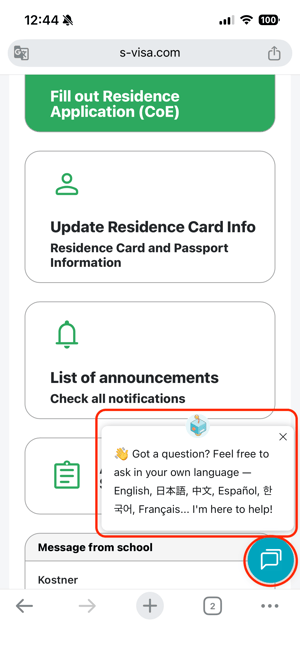
The Help Chat entrance is located in the bottom-right corner of the screen.
When you first open SpeedVisa, you may see a message near the chat icon, as shown in the example image below. This makes the Help Chat easy to find.
- You can close the message by clicking the “X” button.
- Once closed, the message will not appear again until the next day.
2. How to Use the Help Chat
Step 1: Open the Chat
Click the light blue chat bubble icon in the bottom-right corner of the screen.
Step 2: Describe Your Problem
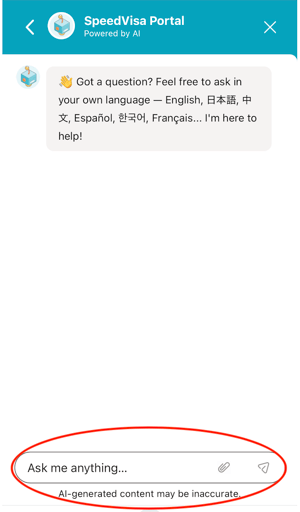
A chat window will appear.
Please describe your issue as specifically as possible.
You can:
- Type in your preferred language (multilingual support is available)
- Attach images or screenshots
- Explain what happened and what you were trying to do
Sending a screenshot of the issue screen can help resolve problems more quickly.
Step 3: AI Chatbot Support (24/7)
The AI chatbot is available 24 hours a day, 365 days a year.
The chatbot can help with:
- How to Use SpeedVisa
- General application procedures
- Common error messages
- Input guidance
- Help article recommendations
Step 4: Human Support
If the AI chatbot cannot solve your issue, human support is also available.
Human support hours:
- Weekdays only
- Japan Time: 10:00–17:00
- Closed on weekends and Japanese national holidays
To receive human support, please leave:
- A description of your issue
- Your email address
Using the same email address registered in SpeedVisa is recommended, as it helps the support team investigate your issue more efficiently.
The support team will reply by chat or email during support hours.
💡 FAQs / Tips
Q. Can I use languages other than English?
Yes. The Help Chat supports multiple languages. Please use the language you are most comfortable with.
Q. Should I attach screenshots?
Yes. Screenshots are highly recommended because they help the support team understand the issue faster.
Q. What kind of questions can the Help Chat answer?
The Help Chat can answer general questions about:
- How to use SpeedVisa
- Residence application procedures
- Input methods and required documents
- Common system errors
Q. Why can’t the support team answer school-specific questions?
SpeedVisa provides services to many schools.
As of 2026, more than 150 schools use SpeedVisa.
Because each school may have different internal rules and procedures, the support team can only provide:
- General information about SpeedVisa
- General information about residence applications
Questions about your school’s individual policies or rules may need to be answered directly by your school.
However, if the following information is available and you agree to share it, our support team may be able to contact your school on your behalf:
- Your name
- Your email address registered in SpeedVisa
- The name of your school in Japan
Please note that this process may take additional time.
If your matter is urgent, we recommend contacting your school directly.