
🎯 Who is this for?
Students who received a survey from their school in SpeedVisa.
❓ Question
My school sent me a survey. How do I answer it? Can I change my answers after I send them?
✅ Answer
Press Answer Survey from School on the Dashboard, answer all questions, and press Send.
After you press Send, you cannot change your answers. Your answers are not saved until you press Send.
📝 How to Answer a Survey
- Open the survey list. Log in to SpeedVisa and press Answer Survey from School on the Dashboard. A red number shows how many surveys you have not answered yet.You can also press Answer Survey in the email from SpeedVisa.

- Choose a survey. The Survey List shows the Status, Title, and Reply deadline(JST) of each survey. A survey you have not answered shows Not answered. Press the survey title.
- Answer the questions. You must answer every question with the Required label. You cannot send the survey if a Required question is empty. To attach a file, press Select File.⚠️ Important: Your answers are not saved until you press Send. If you press Return or leave the page, your answers are deleted. Prepare your files before you start.
- Send your answers. Check all your answers, then press Send. No confirmation screen appears.The message "Saved." appears, and the Survey List opens again. The status of the survey changes to Answered.
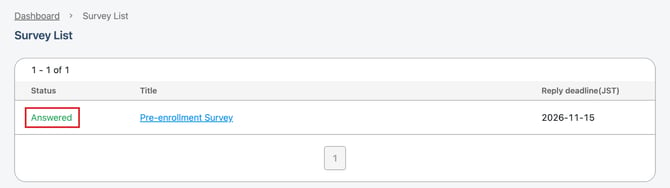
🔒 Can I Change My Survey Answers After I Send Them?
No. After you press Send, you cannot change your survey answers in SpeedVisa.
You can still check the answers you sent. Press Answer Survey from School on the Dashboard, then press the survey title. Your answers and attached files are shown, but you cannot edit them. Only the Return button is shown.
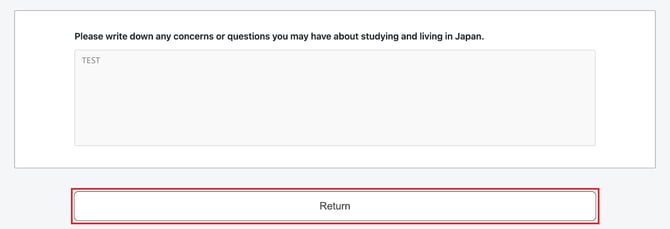
If you need to change your survey answers, please contact the person in charge at your school.
💡 FAQs / Tips
When is the deadline?
The deadline is shown in Japan time (JST) in the Reply deadline(JST) column. The email from SpeedVisa also shows the deadline time, for example "2026/11/15 23:59 (JST)".
What if I missed the deadline?
After the deadline, you cannot answer the survey. Please contact the person in charge at your school. If your school extends the deadline, you can answer the survey.
Can I use Request editing to change my survey answers?
No. Request editing is for your residence application only. It does not work for surveys.