
🎯 Who is this for?
Students who start a part-time job or a paid internship in Japan.
❓ Question
I started a part-time job. How do I tell my school about it in SpeedVisa?
✅ Answer
On the dashboard, press Part-time Jobs & Internships, then press Register. Register one workplace at a time.
Your school can see the information right after you press Add. Your school checks the information.
📝 How to Register a Part-time Job
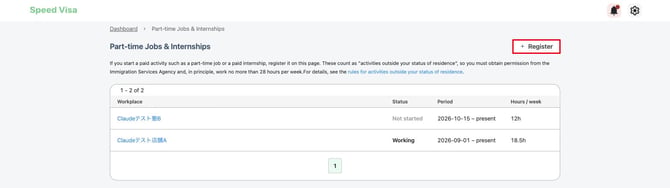
- On the dashboard, press Part-time Jobs & Internships.
- Press Register.
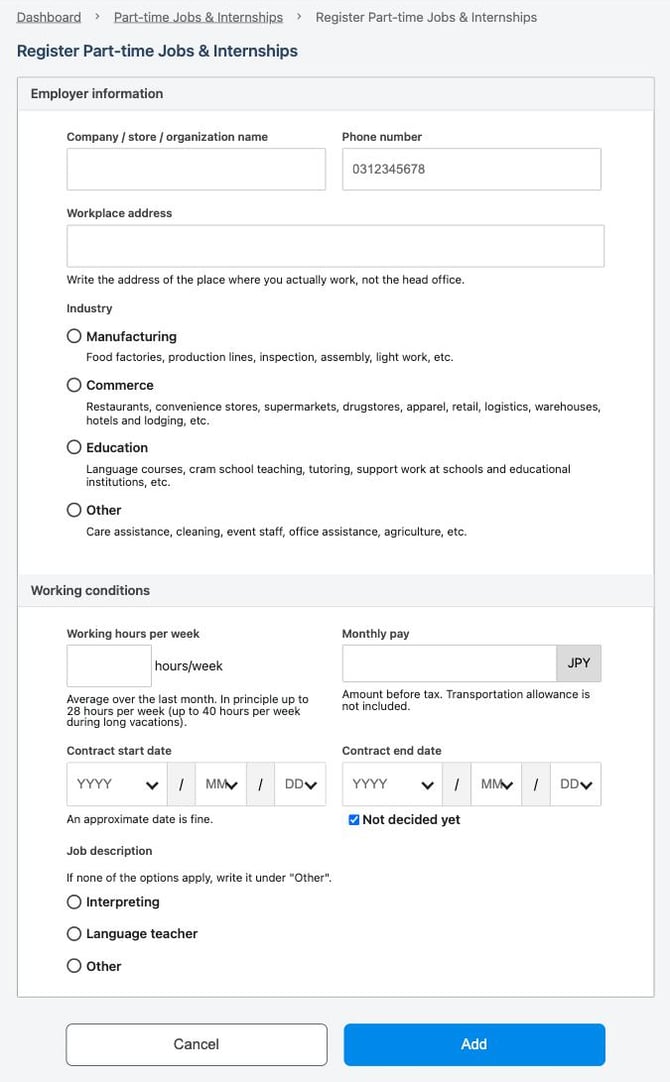
3. Under Employer information, enter the name, phone number, and address of your workplace. Enter the address of the place where you actually work, not the head office.
4. Under Industry, choose the type of work: Manufacturing, Commerce, Education, or Other. Examples are shown under each choice.
5. Under Working conditions, enter your Working hours per week and Monthly pay.
6. Choose the Contract start date. An approximate date is fine.
7. If you know the end of your contract, uncheck Not decided yet and choose the Contract end date. If you do not know it, leave Not decided yet checked.
8. Under Job description, choose Interpreting, Language teacher, or Other. If you choose Other, write your job in the box.
9. Press Add.
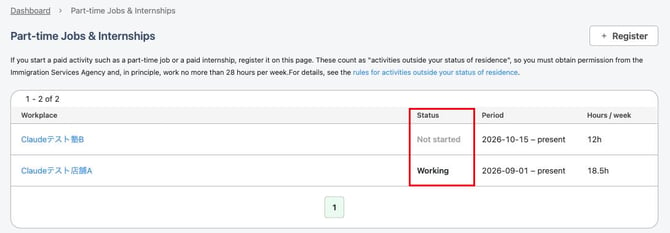
"Saved." appears, and your workplace is added to the list. The Status column shows Working or Not started.
How to enter your working hours and pay
- Working hours per week: Enter the average hours per week over the last month. You can enter a number like 7.5.
- Monthly pay: Enter the amount before tax. Do not include transportation money.
- Phone number: Enter numbers only, without "-". Example: 0312345678.
💡 FAQs / Tips
I have two part-time jobs. What should I do?
Register each workplace separately. Press Register again for the second job.
My job ended. What should I do?
On the list, press the name of the workplace. Press Enter end date, choose the end date of your contract, and press Save. If you do not know the end date of the contract, choose the last day you worked.
My working hours or pay changed.
On the list, press the name of the workplace. Press the ⋮ button at the top right, and press Edit. Change the information and press Save.
I registered a job by mistake.
On the list, press the name of the workplace. At the bottom of the page, press Delete this part-time job.